System Services and Broadcast Receiver in ANDROID


Create a new project : 

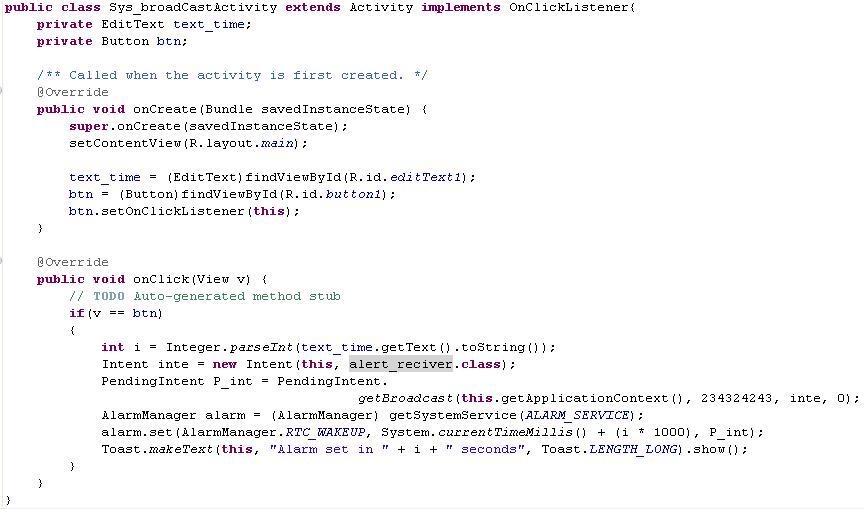
in main Activity :

create new Broadcast Receiver :


in your project manifest file :


Comments

Popular posts from this blog

Android - Google MAP V2 PART 1

Download Full Code  of PART-1 , 2 , 3 , 4 Download and configure Google Play Services Library in Eclipse Google Map for Android is now integrated with Google Play Services. So we need to set up Google Play Service Library for developing Google Map application in Android. Get the API key for Google Maps v2: Linux  :  For any other OS use this :  keytool -list -v -alias androiddebugkey \ -keystore <path_to_debug_keystore>debug.keystore \ -storepass android -keypass android Register with the Google APIs Console :    Google APIs Console  Select here the  Services  entry: Activate the  Google Maps Android API v2 . Register your application via its package in this console together with the SHA-1 fingerprint of your signature key. Click on Create new Android Key.. Add you SHA-1 and your package name in to box like example given in alert box. Support library...

Multi-Selection ListView ANDROID with CheckBox

Shaadi.com Indian Matrimonials Download code Create New Android Project: in res/layout/main.xml create new layout for list row : in res/layout/list_row.xml in your Main Activity Class: Create Class name mItems: Create New Class name SelectViewHolder: Create New Class name SelectArrayAdapter: Download Source Code Click Here : Check PART2 for more detail. Shaadi.com Matrimonials

ANDROID - update status Linked-IN

jars: 1. linkedin-j-android.jar 2. scribe-1.3.1.jar MainActivity: package com.testshare; import java.util.EnumSet; import org.scribe.oauth.OAuthService; import android.app.Activity; import android.content.Intent; import android.os.Bundle; import android.util.Log; import com.google.code.linkedinapi.client.LinkedInApiClient; import com.google.code.linkedinapi.client.LinkedInApiClientFactory; import com.google.code.linkedinapi.client.enumeration.NetworkUpdateType; import com.google.code.linkedinapi.schema.Network; public class TestshareActivity extends Activity { private int LINKEDIN_OAUTH_RESULT_CODE = 4000; private OAuthService service; private static final String PROTECTED_RESOURCE_URL = "http://api.linkedin.com/v1/people/~"; /** Called when the activity is first created. */ @Override public void onCreate(Bundle savedInstanceState) { super.onCreate(...